Practical Loop Engineering
Goals, loops, and the discipline of not delegating your judgment

The way that I typically work is I have anywhere between five and ten agents working at the same time in parallel. There are going to be some tasks that I’m very happy to delegate fully to agents, as long as I have a very clear idea of the stopping conditions and the constraints around them. And then there are going to be some tasks where I am going to want to keep a closer eye and code-review what the agent is doing.
Now within that, you’ve probably heard about loop engineering. I talked about it a couple of months ago when I wrote a big blog post about it.
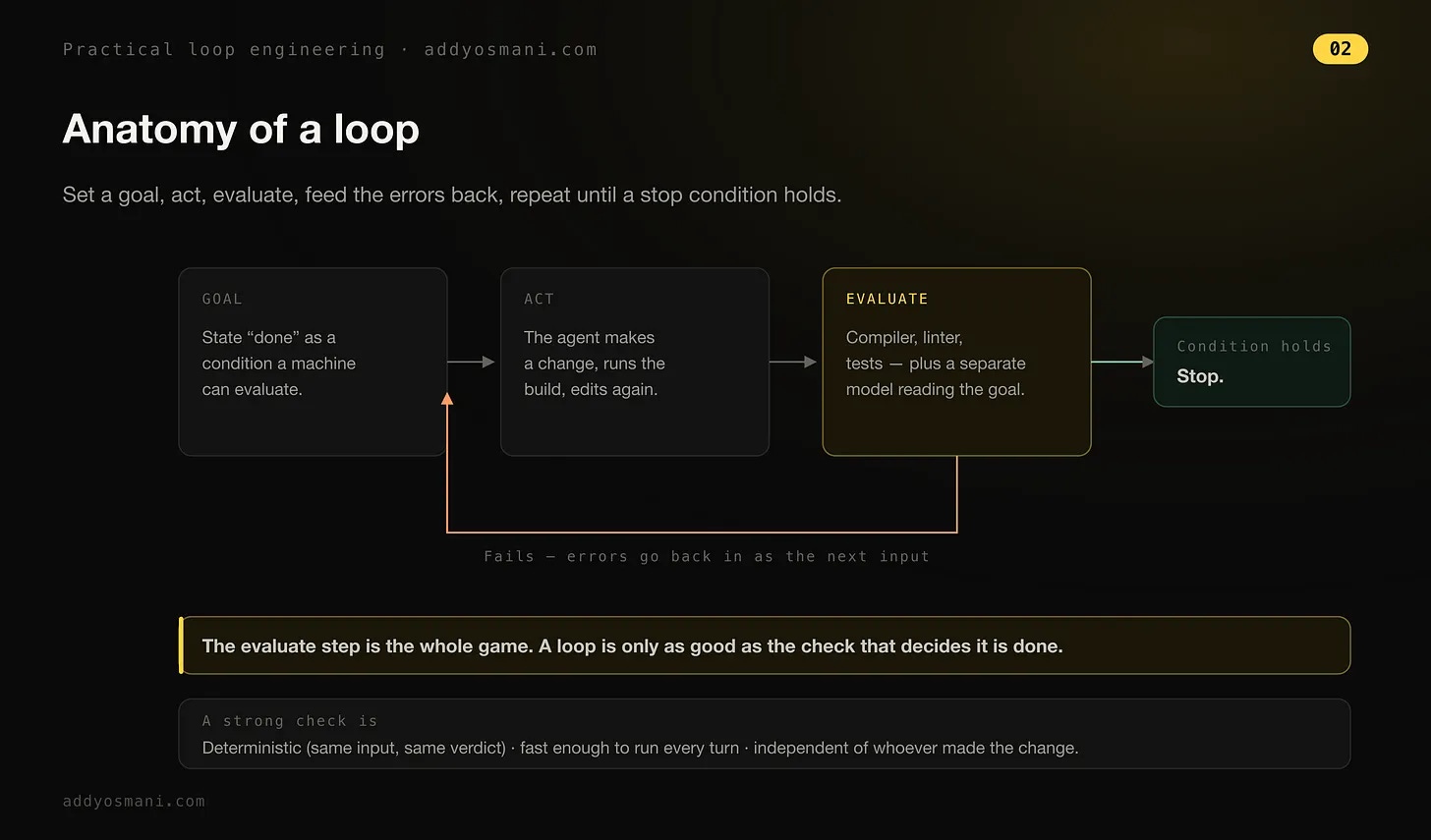
A loop is an autonomous, self-correcting feedback cycle where an AI agent repeatedly acts, tests its results and adjusts its approach until a specific goal is met
A quick message from our sponsor:
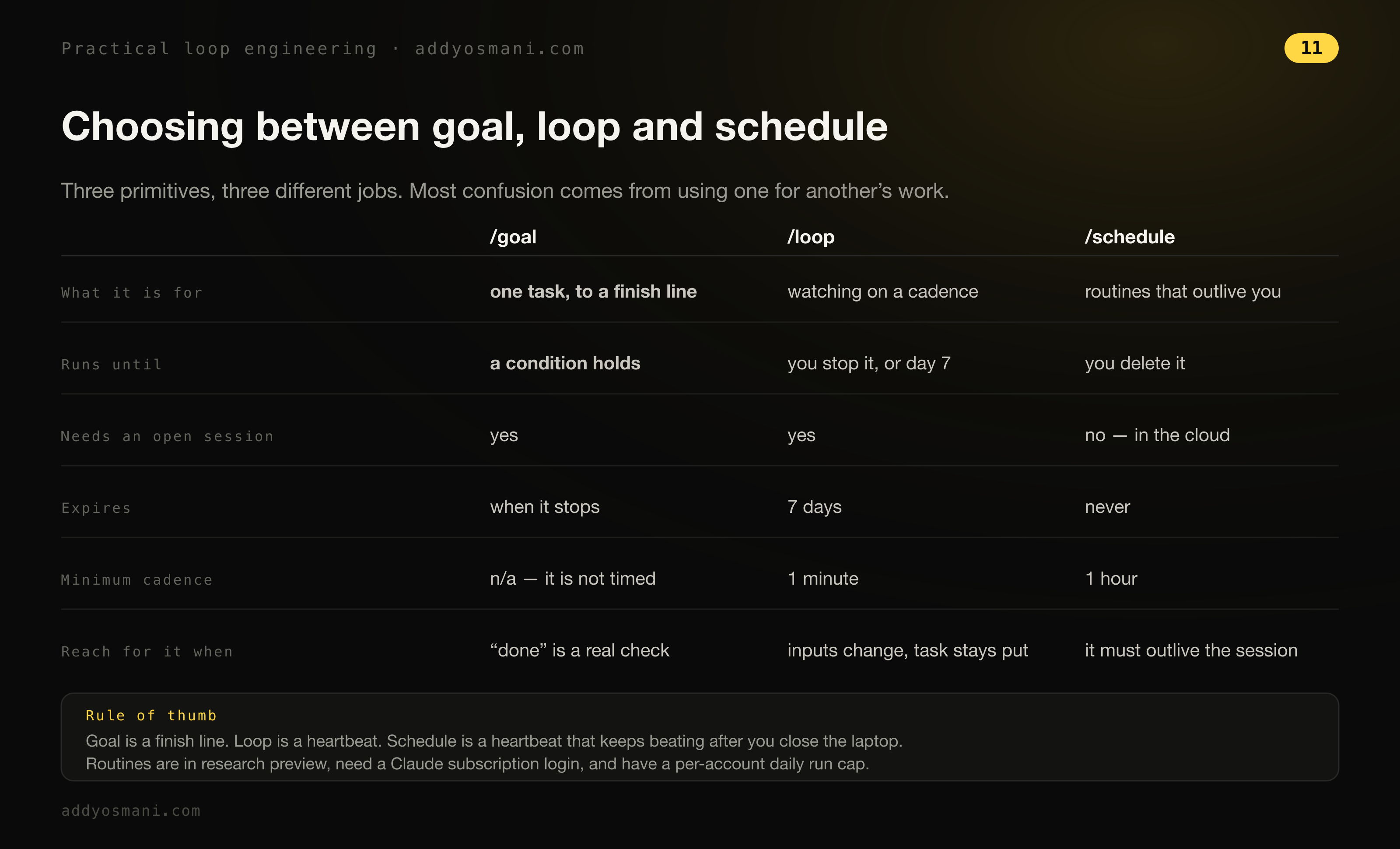
There are now basically two core primitives you can think about. In Claude Code you have a goal primitive, which can drive a single bounded task forward until you’ve got a particular goal, like a measurable finish line that’s been met. And then loop reruns on a timer or a fixed interval, so you can use it to kind of schedule changes.
Before the primitives were primitives
I remember back before we had primitives baked into Claude Code and Codex, loop engineering was heavily about setting up your own bash loop, a hand-rolled thing. That’s how I approached it. And you might remember earlier in the year, a number of us were playing around with the Ralph loop by Geoff Huntley. We were experimenting, we were sharing our workflows, we were sharing what worked and what didn’t, but it was largely on some of our personal projects where, if we ran into a wall, it didn’t really have a big cost to us because it was on personal projects.
And as we’ve tried to see what patterns, what aspects of loop engineering are now a little bit more baked, I think we have a clearer idea of how you babysit it. I can now largely rely on the output of the primitives in Claude Code and Codex. We’ve come a little way. But at the same time, you need to be very diligent, because loop engineering where you kind of leave it sitting alone, and you haven’t really thought about whether the end goal or the constraints have been well defined, can leave you in a problematic state. This is why there’s nuance when deciding to use it for an evergreen codebase without users or as much historical complexity vs. say a brownfield bank codebase.
How the Claude Code team frames loops
The Claude Code team published their take on four kinds of loops and it lines up with how I use the primitives (their write-up). Before we get to it, here’s my quick summary:
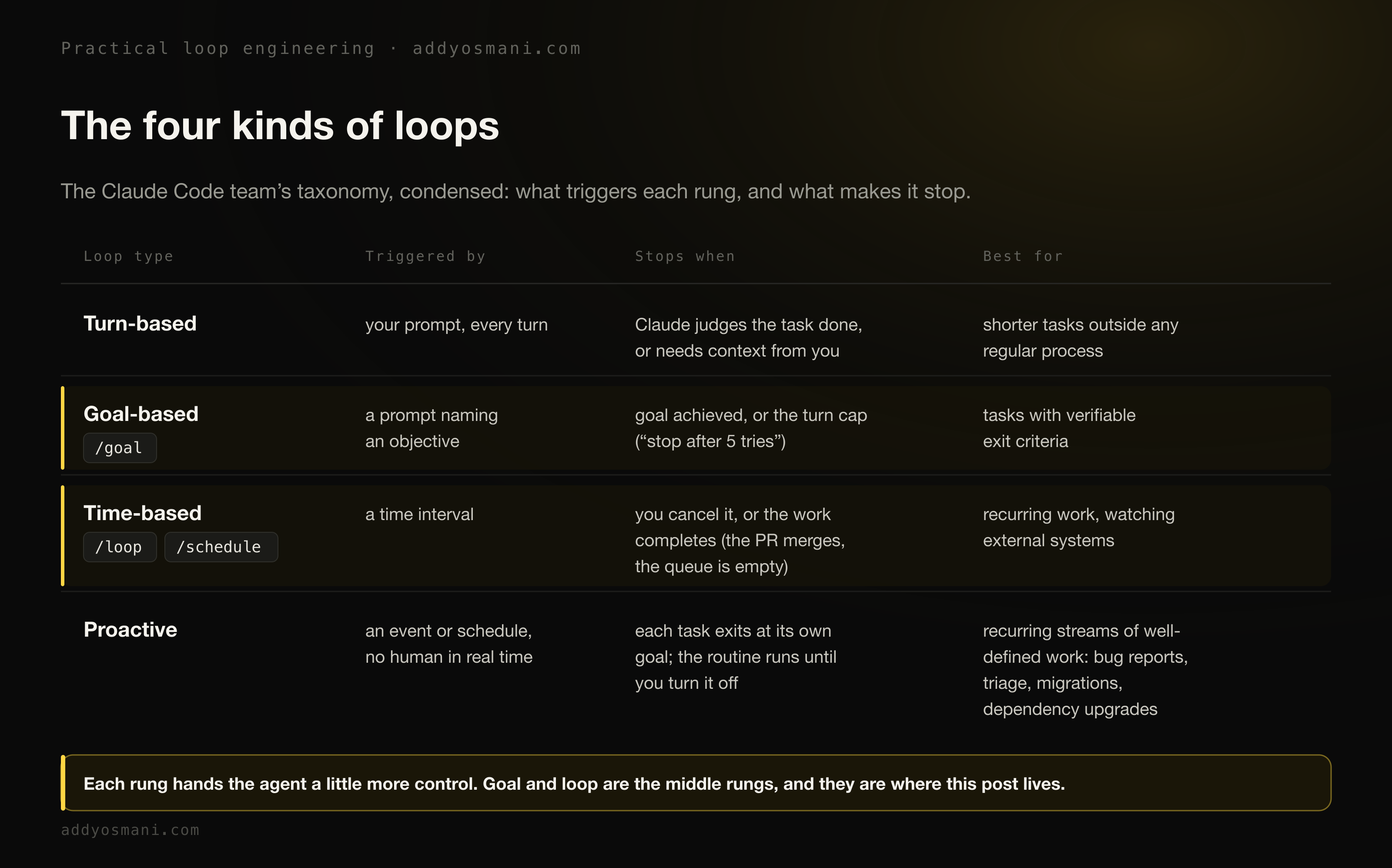
On the Claude Code team, we define loops as agents repeating cycles of work until a stop condition is met. We categorize a few different types of loops based on: how they are triggered, how they are stopped, what Claude Code primitive is used, what type of task is most appropriate for each. Not all tasks require complex loops; start with the simplest solution and use these patterns selectively.
Every prompt you send starts a manual loop with you directing each turn. Claude gathers context, takes action, checks its work, repeats if needed, and responds. We call this the agentic loop. For example, ask Claude to create a like button. It reads your code, makes the edit, runs the tests, and hands back something it believes works. You then manually check the work, and write the next prompt.
Their write-up walks each rung.
On goal-based loops:
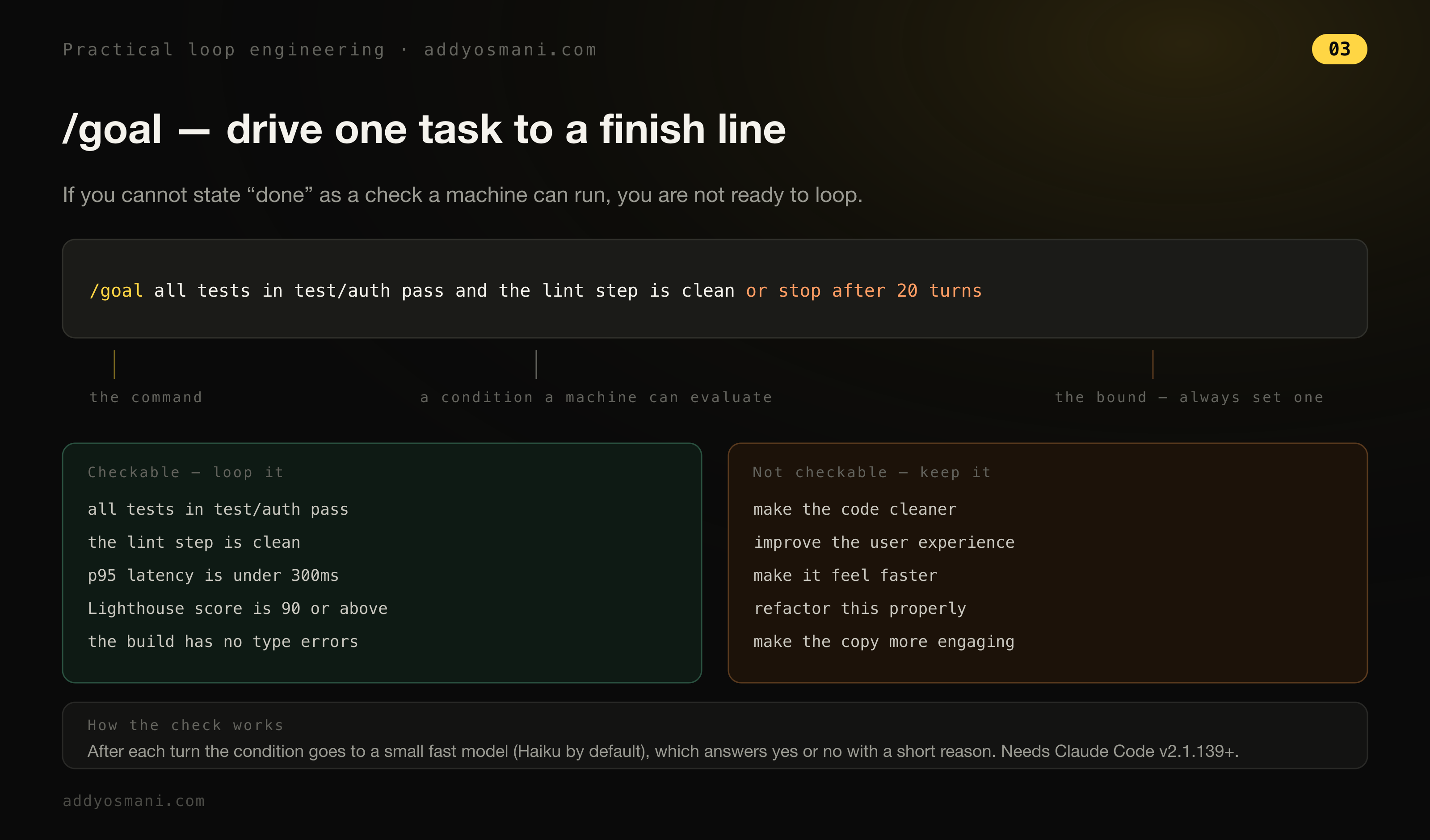
Sometimes, a single turn is not enough, especially for more complex tasks. Agents do better when they can iterate. You can extend how long Claude keeps iterating by defining what done looks like with /goal. When you define the success criteria, Claude doesn’t have to make a determination on what is “good enough” and end the loop early. Each time Claude tries to stop, an evaluator model checks your condition and sends it back to work until the goal is met or a number of turns you define is reached. This is why deterministic criteria, such as number of tests passed or clearing a certain score threshold, are so effective. For example: /goal get the homepage Lighthouse score to 90 or above, stop after 5 tries.
On time-based loops:
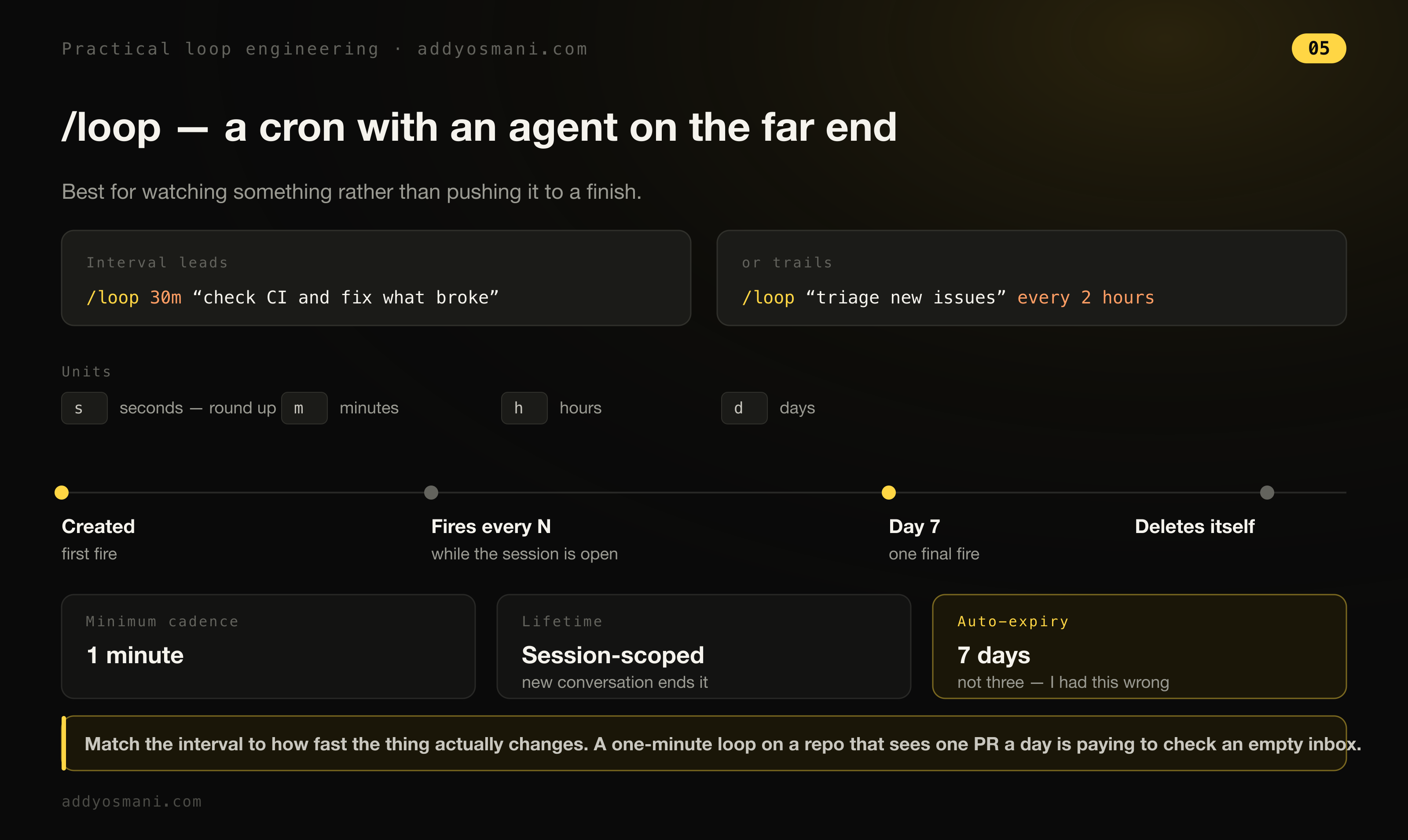
Some agentic work is recurring: the task stays the same and only the inputs change. For example, summarizing Slack messages every morning. Other work depends on external systems, and a simple way to interface with one is to check it on an interval and react to what changed. For example, a PR which may receive code reviews or fail CI. For these, you can trigger when Claude runs with /loop, which re-runs a prompt on an interval. For example: /loop 5m check my PR, address review comments, and fix failing CI. /loop runs on your computer, so if you turn it off, it stops. You can move the loop to the cloud by creating a routine with /schedule.
And on proactive loops, the top rung:
Triggered by: an event or schedule, with no human in real time. Stop criteria: each task exits when its goal is met. The routine itself runs until you turn it off. Best used for: recurring streams of well-defined work: bug reports, issue triage, migrations, dependency upgrades. Managed usage by: routing routines to smaller, faster models and using the most capable model for judgment calls.
Their verification advice is worth lifting whole, because it moves the manual checking into something Claude applies itself:
---
name: verify-frontend-change
description: Verify any UI change end-to-end before declaring it done.
---
# Verifying frontend changes
Never report a UI change as complete based on a successful edit alone.
Verify it the way a human reviewer would:
1. Start the dev server and open the edited page in the browser.
2. Interact with the change directly. For a new control (button, input,
   toggle): click it, confirm the expected state change, and screenshot
   before/after.
3. Check the browser console: zero new errors or warnings.
4. Use the Chrome Devtools MCP, run a performance trace and audit
   Core Web Vitals.
If any step fails, fix the issue and rerun from step 1 - do not hand
back partially verified work.
Goal
The way that I use goal is I use it for building any specific piece of work until it’s provably done. Like for example, you can use a goal to say: make sure that this experience loads in five seconds, keep going until it’s done. And it will continue to use an independent evaluation check to keep checking if the completion criteria has been met. What’s better is to be even more specific about what tooling is being used.
As for real goals that I’ve run to a number, there’s a few things that I’ve done. I’ve used goals for running through GitHub issues: review and close the last 10 issues, or review and move the last 10 issues forward, something like that. And that’s semi-open-ended, right? Or: let’s make this page load 50% faster. Sometimes that works well, sometimes it doesn’t, but it’s really about the experimentation.
Loop
Loop is a little bit more of a scheduler, so it keeps an eye on something or repeatedly executes a pattern on some cadence. So think of it a little bit like a cron. It’s best for doing things like polling logs or monitoring external states. You could use it for potentially checking in. If there are repetitive tasks you find yourself doing on some cadence, loop is pretty good for that.
What I delegate, and what I watch
For me, I use probably between five and ten agents every day. Very typically I’ll max out at about five concurrently. And some of those tasks might be ones that are a little bit safer. So maybe it’s, hey, I implemented this feature, go write the documentation for it. Or go double check that we have sufficient test coverage. Or something in that vein. If I’m working on a more complex problem, or something where I know that even if I’ve given it a good spec, or what I think was a good spec, and I’ve tried to give it some stopping conditions, there is still a reasonable chance it may not get everything right, I would try to watch it more closely. If the task involves anything just a little bit sensitive, whether it is I’ve given this access to a system, or whether the feature happens to touch authentication, or something related to security or finance, I’ll definitely be watching that closely.
Generally speaking, I do think we’re going to get to a place where folks are increasingly comfortable with delegation, as long as they’re able to have these clear ways of verifying that their goal or their stopping condition has been met. But you do still need to take a look at the code, at the thing that’s being generated, to make sure that it’s meeting your mark.
The other habit that matters here is not letting the agent that did the work decide the work is good. One sub-agent drafts the change. A separate one verifies it.
Sometimes an agent can be confident about something, and a verifying agent can catch things that they weren’t necessarily expecting. Like if it thinks that the baseline performance of an experience it’s generated is actually fine, and it’s only evaluating performance based on desktop, but you’re actually caring about the experience on mobile. That might mean the agent is being very confident about one dimension of the problem, but not the other.
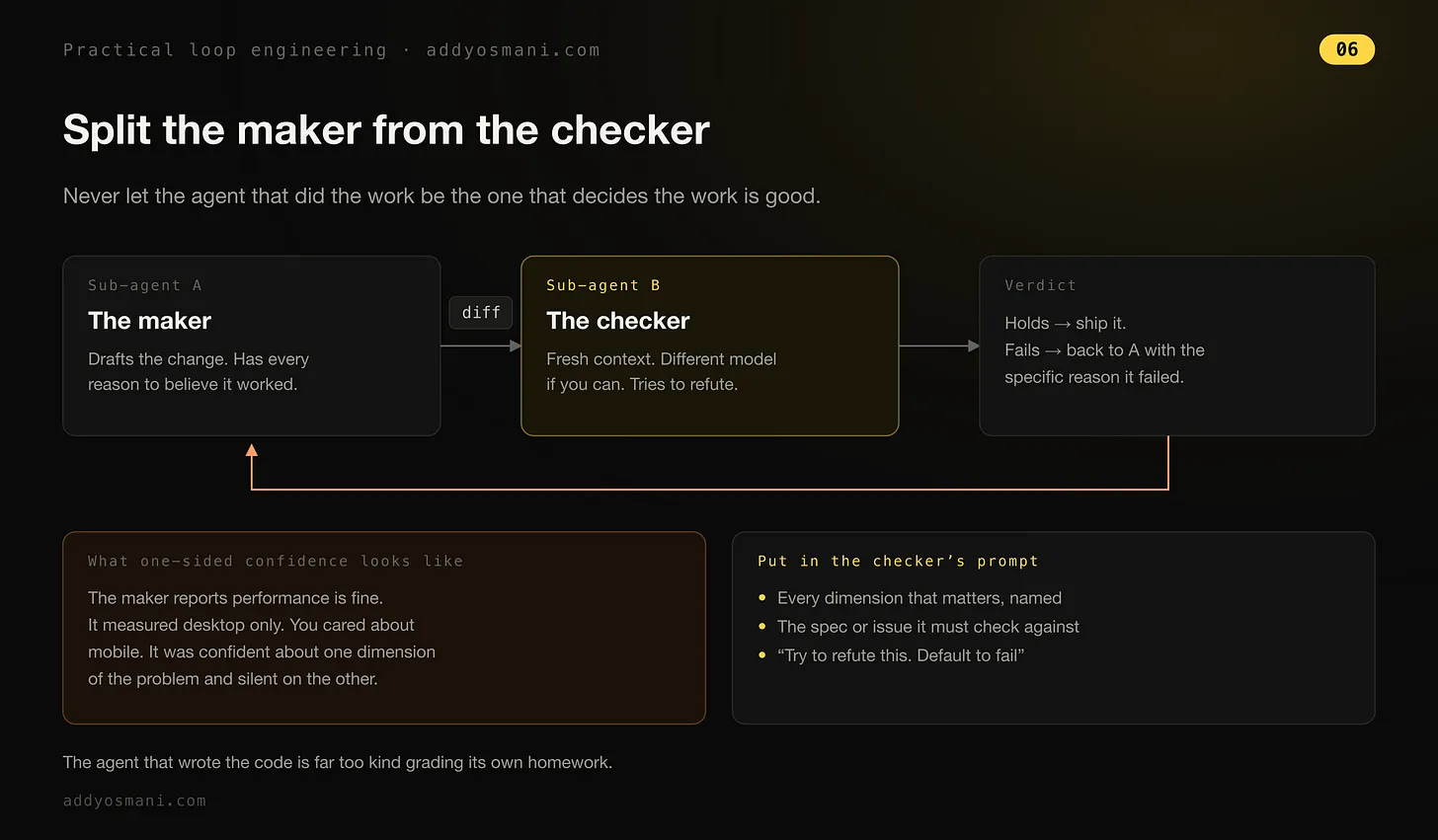
And I learned this one the hard way. I was curious to figure out: is there something that we’re missing that we haven’t gotten direct feedback on from our users, either in an issue tracker or in a comment somewhere? And so I asked it to go and take a look at some of our competitors, and put together a list, and some PRs, not pushed, but some PRs locally, of what solving some of those gaps might look like. And I almost pushed some of those changes. But I didn’t actually look at them closely enough. I read through its research, but I didn’t look at the implementations closely enough. So I delegated the task, but I was close to delegating the judgment as well. Now, when I actually looked through the changes, what I realized is that it would introduce a lot of additional complexity for our users, for, I think personally, not all that much gain. And so I feel like you need to sometimes check yourself, that you are not delegating the taste and the judgment to your agent. You’re delegating the task, and then you are actually checking back that it’s meeting your bar.
The evaluator sitting behind goal is not that checker, by the way. It doesn’t look at the content to see if it’s good or bad in any way, shape, or form. All it does is examine the conversation transcript to see if the hard rules you specified have been met.
/goal Refactor the data-fetching layer in Dashboard.tsx until Lighthouse performance score is >= 92 and LCP is under 1.8s as shown by the Lighthouse CLI output. Do not change the public API of any hooks. Each turn must improve at least one reported metric; abort if two consecutive turns show no improvement. Stop after 10 turns.
The workflow I run every day
One of the workflows that I do every day: I have a popular open source repository called Agent Skills. We’ve got over 80,000 stars, and up until recently we were getting anywhere up to like 80 or 90 pull requests that we had to review a day. And so every day I would go and I would spend some time checking on this. Now with loop, what you can do is say: well, every 24 hours or every 12 hours, check the GitHub repository for any new open issues and provide a summary of their urgency, or provide a first pass review, or anything like that.
/loop every 1h "Check the GitHub repository for any new open issues. Provide a bulleted summary of their urgency."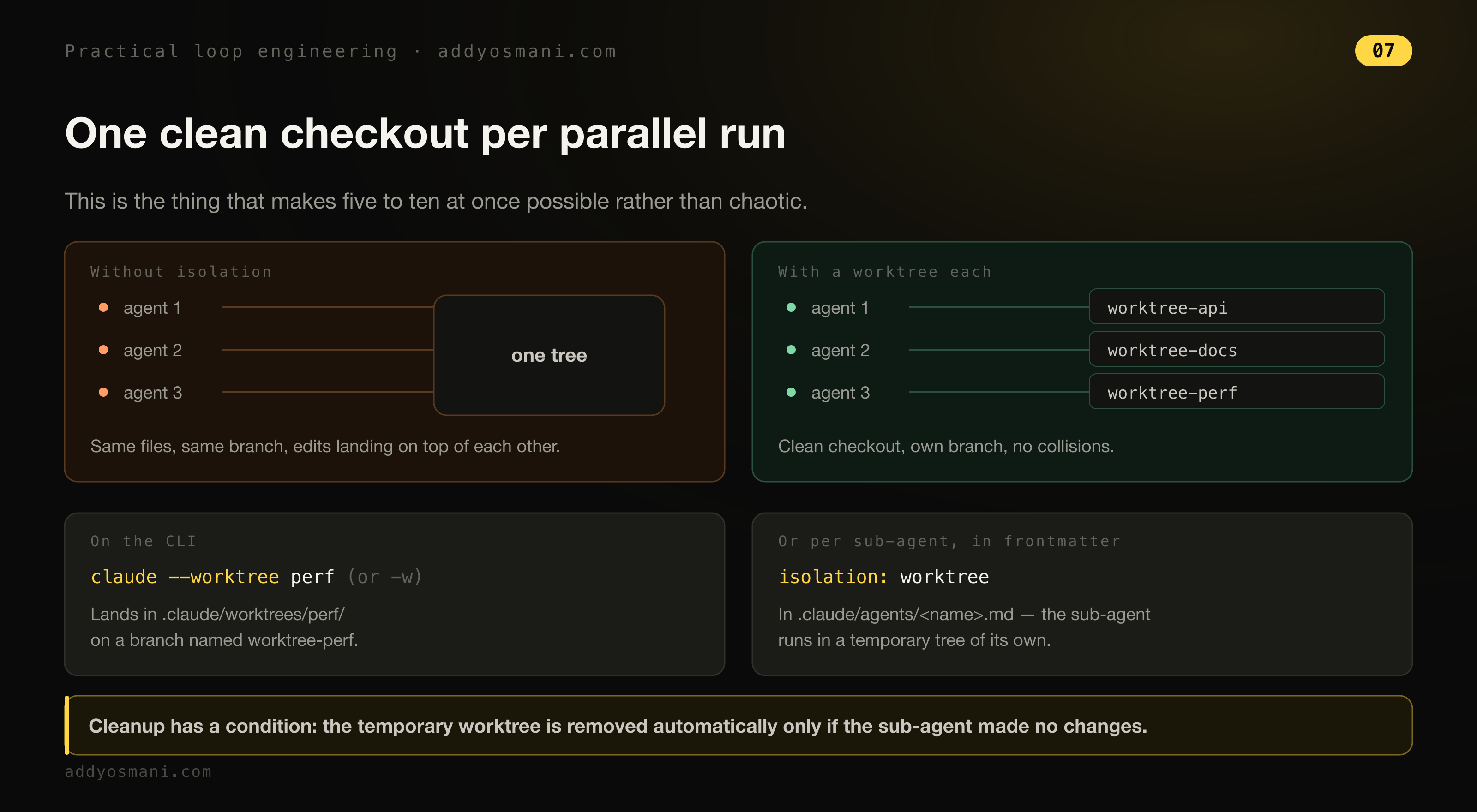
Combining loops and goals
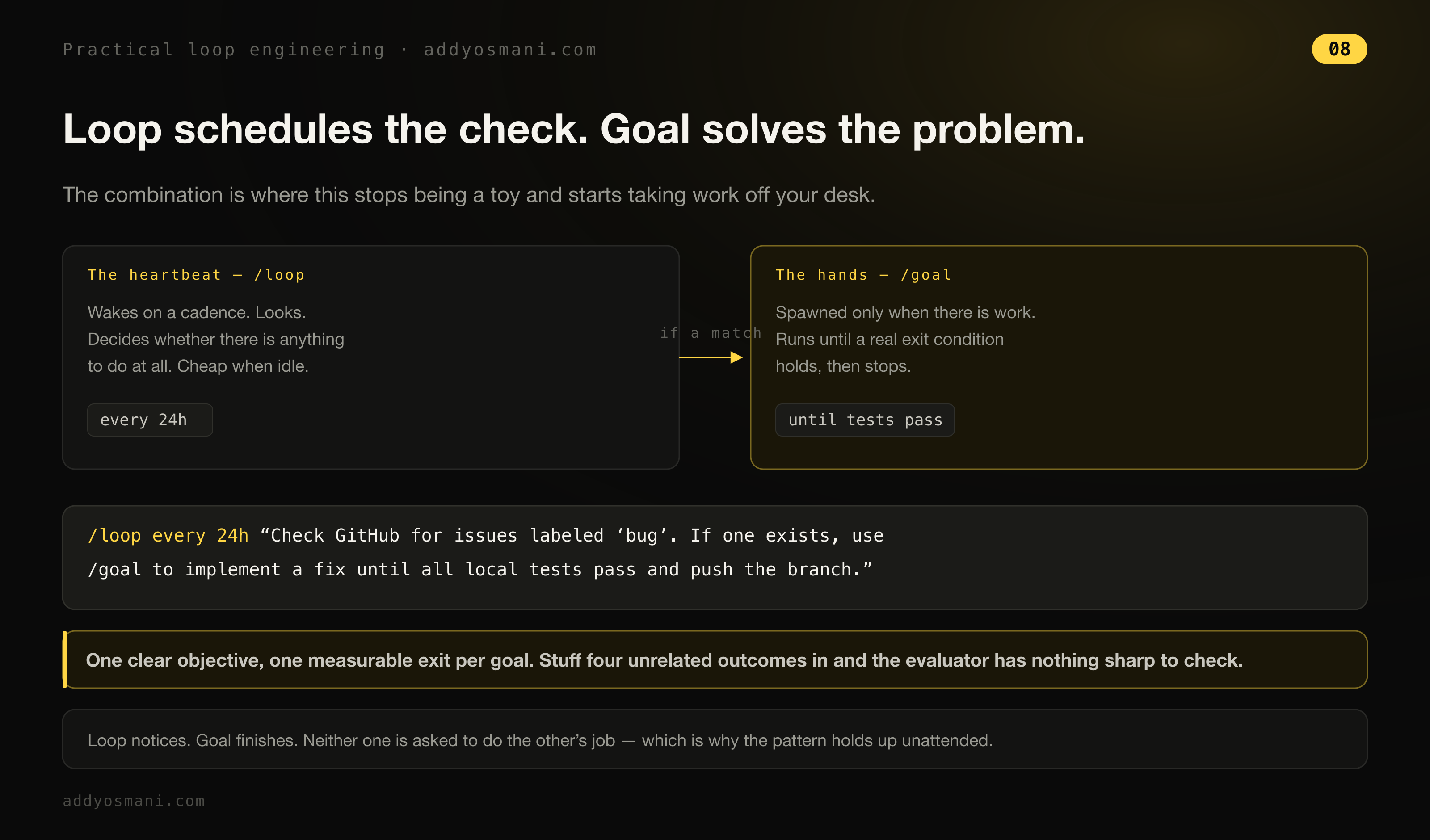
Now you can also sort of combine loops and goals. So you use loop to schedule a check, and then goal to solve the problem. So you can say something like: loop for every 24 hours, check GitHub for issues labeled bug. If one exists, use goal to implement a fix until all local tests pass and push the branch.
/loop every 24h "Check GitHub for issues labeled 'bug'. If one exists, use /goal to implement a fix until all local tests pass and push the branch."But also keep in mind that goal has got some limitations around just how much you can sort of cram in there.
Their write-up also has a composed example that shows where this is all heading:
The primitives above, along with other Claude Code features like auto mode and dynamic workflows (research preview) can be composed into a loop for long-running work. For example, to handle incoming feedback, you can use: /schedule (research preview) to run a routine that checks for new reports, /goal to define what done looks like, and skills to document how to verify it. Dynamic workflows to orchestrate agents that triage each report, fix it, and review the fix. Auto mode so the routine runs without stopping to ask for permission. Putting it together, a prompt could look like this: /schedule every hour: check the project-feedback channel for bug reports. /goal: don’t stop until every report found this run is triaged, actioned, and responded to. When fixing a bug, use a workflow to explore three solutions in parallel worktrees and have a judge adversarially review them.
What the triage system actually does
Inside the PR triage, when I have loops and goals working together for me, what I end up having is a system that allows me to really continue accepting PRs and issues, being able to stay on top of what is coming on my plate every day, and especially being able to cross-reference. That’s been a really big deal for me. If I want to work on a particular goal of, hey, we’re going to be redoing this part of the system, and I need to make sure that any issues that happen to touch it are closed as a result of this rework, or we’re not stepping on anyone else’s toes, I can make sure that that’s well defined.
Scheduled tasks are really useful for regularly just reviewing new PRs and closing things that clearly don’t fit. One good stopping condition, for example: we have a set of contribution guidelines, and our contribution guidelines include things like, hey, we currently don’t accept translations.
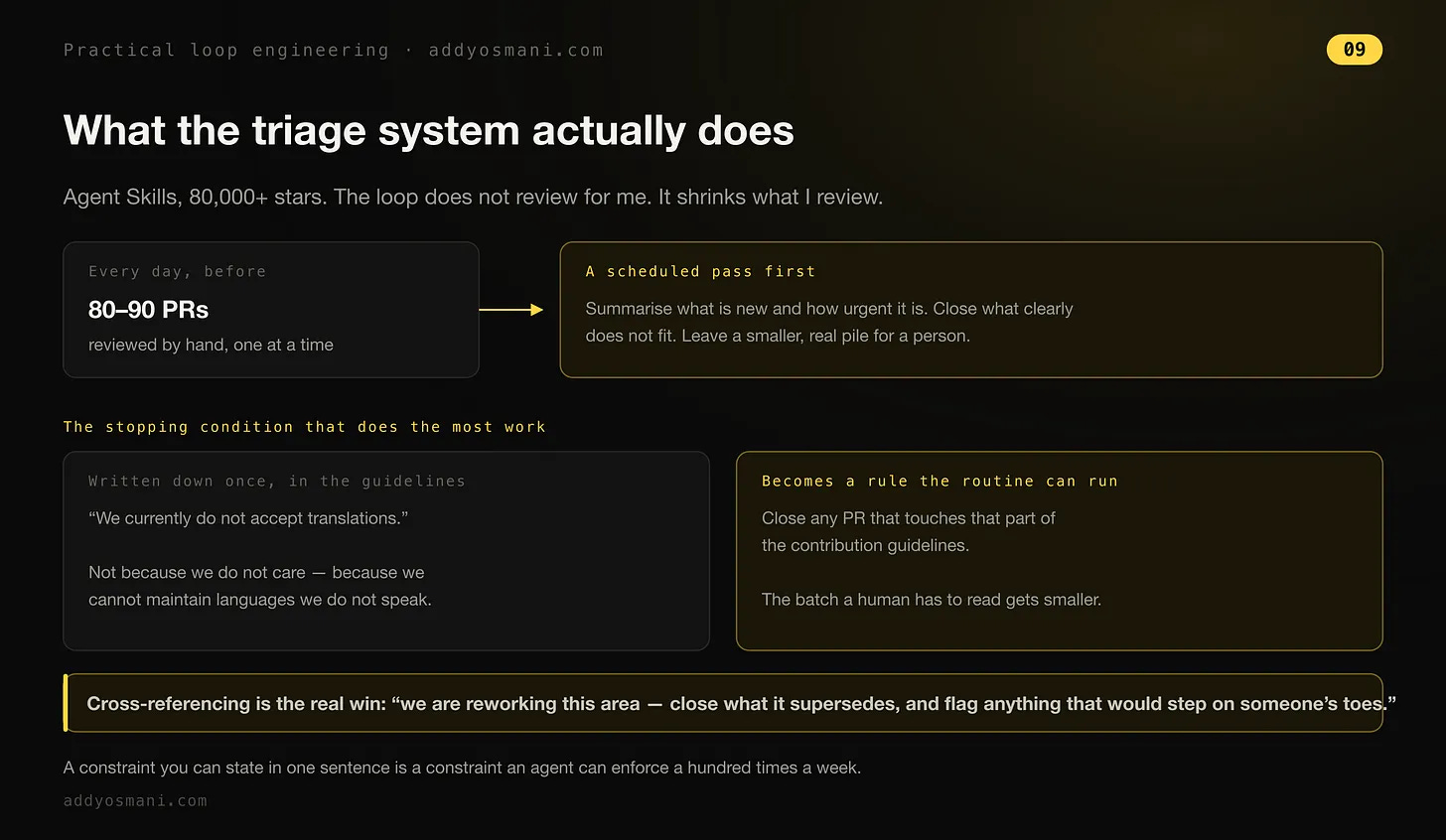
And it’s not that we don’t care, it’s that they’re difficult for us to maintain, because we don’t speak all the languages often coming in. And so if we tell it, close any issues or close any PRs which happen to touch that aspect of our contribution guidelines, that’s something that can do really well when it’s on that schedule. And so it reduces the overall batch of things that we need to review.
What loops don’t buy you
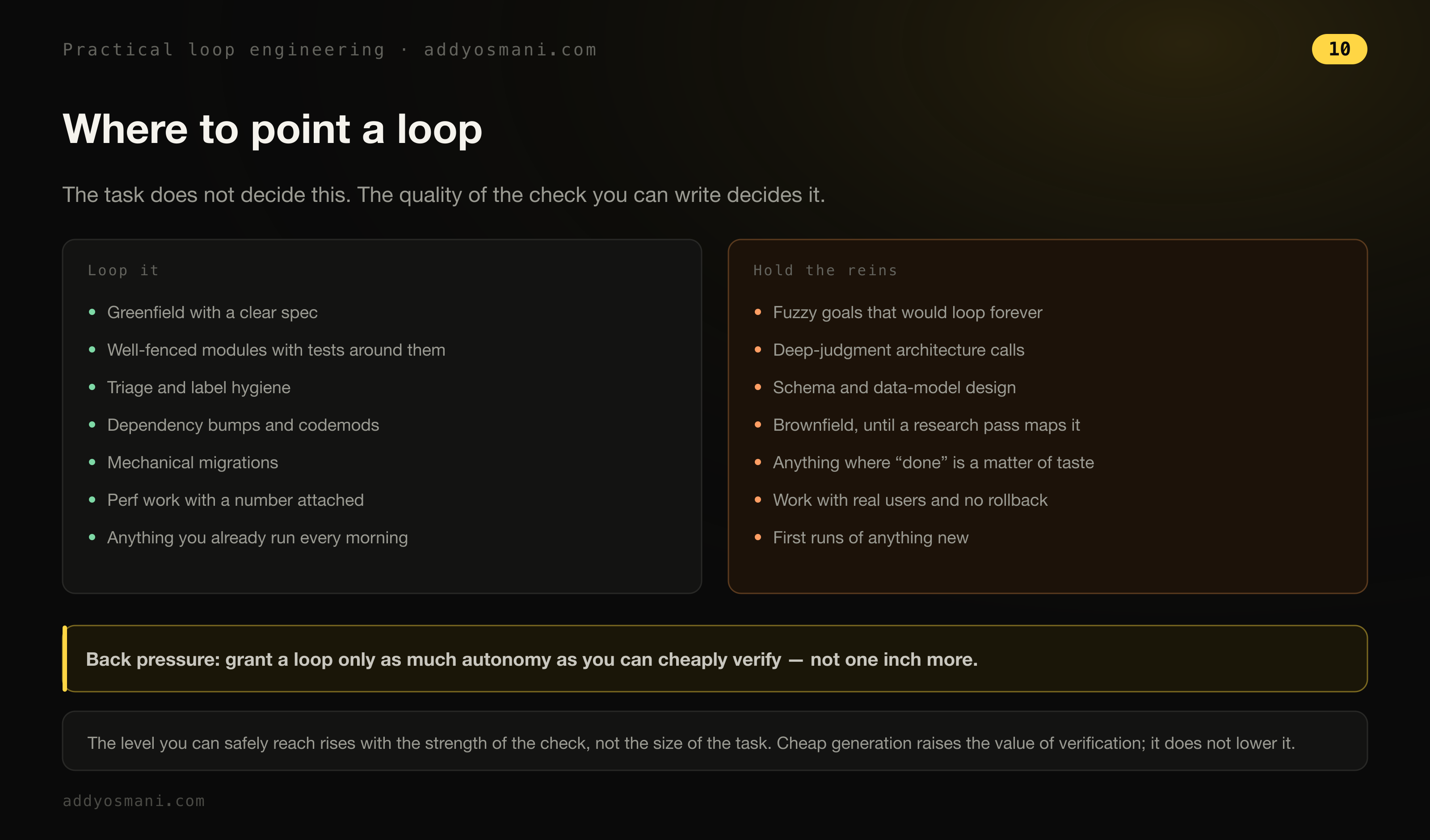
I’m often asked what loop engineering is not a great fit for. Generally speaking if you don’t have a clear idea of what the end-state/done/good means for your completion, it may not be the right pattern for your work. For example, a vague goal would be “keep going until this UI design is good”. What does that mean? Good to who? How is it being evaluated? Tasks that require human taste, subjective design, or open-ended creative exploration aren’t a good fit. When you have a pretty clear idea of the goal, I think loops are a good option to consider.
A final message from our sponsor:
The fine print
One classic sign that you’ve got a loop spinning in place is the same command being tried over and over without any change in the result. Give the same command a third time with no change from the second and it’s probably time to stop.
One bit of fine print worth knowing. Recurring loops expire seven days after creation. I’d been telling people this was three days. It’s seven. And loops are session-scoped, so they stop when you start a new conversation - though resuming that session with --resume or --continue brings back any recurring task still inside its seven-day window. If you need something that outlives your session, /schedule runs it in the cloud.
If there’s a check you already run every morning by hand, that’s your first loop. Mine was the pull request pile.